tempo, fuso horário
English
Français
Deutsch
Español
日本語
繁體
简体
Português
Italiano
Русский
Hora Mundial , Tempo , Fuso Horário, Fuso Horário Mundial , Relógio
Area
América do Norte
Anguila
Antígua e Barbuda
Bahamas
Barbados
Belize
Bermudas
Ilhas Virgens Britânicas
Canadá
Ilhas Caimão
Costa Rica
Cuba
Curaçau
Dominica
República Dominicana
El Salvador
Granada
Guadalupe
Guam
Guatemala
Honduras
Jamaica
México
Montserrat
Nicarágua
Ilhas Marianas do Norte
Panamá
Porto Rico
São Cristóvão e Névis
Santa Lúcia
Saint Pierre e Miquelon
São Vicente e Granadinas
Ilhas Turcas e Caicos
E.U.A.
E.U. Ilhas Virgens
América do Sul
Argentina
Aruba
Bolívia
Brasil
O Chile
Colômbia
Equador
Ilhas Malvinas
Guiana Francesa
Guiana
Paraguai
Peru
Uruguai
VenezuPela
Venezuela
Europa
Albânia
Andorra
Arménia
Áustria
Belarus
Bélgica
Bósnia
Bulgária
Croácia
Chipre
República Tcheca
Dinamarca
Estónia
Ilhas Faroe
Finlândia
França
Alemanha
Gibraltar
Grécia
Hungria
Islândia
Irlanda
Itália
Kosovo
Letónia
Liechtenstein
Lituânia
Luxemburgo
República da Macedônia
Malta
Moldávia
Mónaco
Montenegro
Holanda
Noruega
Polónia
Portugal
Roménia
Rússia
San Marino
Sérvia
Eslováquia
Eslovénia
Espanha
Suécia
Suíça
Turquia
Reino Unido
Ucrânia
da Cidade do Vaticano
Austrália Pacífico
Samoa Americana
Austrália
Ilhas Cocos
Ilhas Cook
Fiji
Polinésia Francesa
Kiribati
Ilhas Marshall
Micronésia
Nauru
Nova Zelândia
Niue
Ilha Norfolk
Palau
Papua-Nova Guiné
Ilhas Pitcairn
Ilhas Salomão
Tonga
Tuvalu
Vanuatu
Wallis e Futuna
Ásia
Afeganistão
Azerbaijão
Barém
Bangladesh
Butão
Brunei
Camboja
China
Faixa de Gaza
Geórgia
Hong Kong
Índia
Indonésia
Irão
Iraque
Israel
Japão
Jordânia
Cazaquistão
Kuwait
Quirguistão
Laos
Líbano
Macau
Malásia
Mongólia
Myanmar
Nepal
Coréia do Norte
Omã
Paquistão
Filipinas
Catar
Arábia Saudita
Cingapura
Coréia do Sul
Sri Lanka
Síria
Formosa
Tajiquistão
Tailândia
Timor
Turquemenistão
Emirados Árabes Unidos
Uzbequistão
Vietnã
Banco ocidental
Iémen
África
Argélia
Angola
Benim
Botsuana
Burkina Faso
Burundi
Camarões
Cabo Verde
Central Africano República
Chade
Comores
Congo
República Democrática do Congo
Cote dIvoire Costa do Marfim
Djibuti
Egito
Guiné Equatorial
Eritréia
Etiópia
Gabão
Gâmbia
Gana
Kenya
Lesoto
Libéria
Líbia
Madagáscar
Malawi
Mali
Mauritânia
Maurícia
Mayotte
Marrocos
Moçambique
Namíbia
Níger
Nigéria
Reunião Francês
Ruanda
Santa Helena
São Tomé e Príncipe
Senegal
Seicheles
Serra Leoa
Somália
África do Sul
Sudão
Suazilândia
Tanzânia
Togo
Tunísia
Uganda
Saara Ocidental
Zâmbia
Zimbabué
Harare - Harare Hora Mundial , Tempo , Fuso Horário, Fuso Horário Mundial , Relógio
fuso horário padrão:
UTC/GMT+2
horário de verão:
sem horário de verão
fuso horário atual:
UTC/GMT2
instalar o conversor de fuso horário livre!
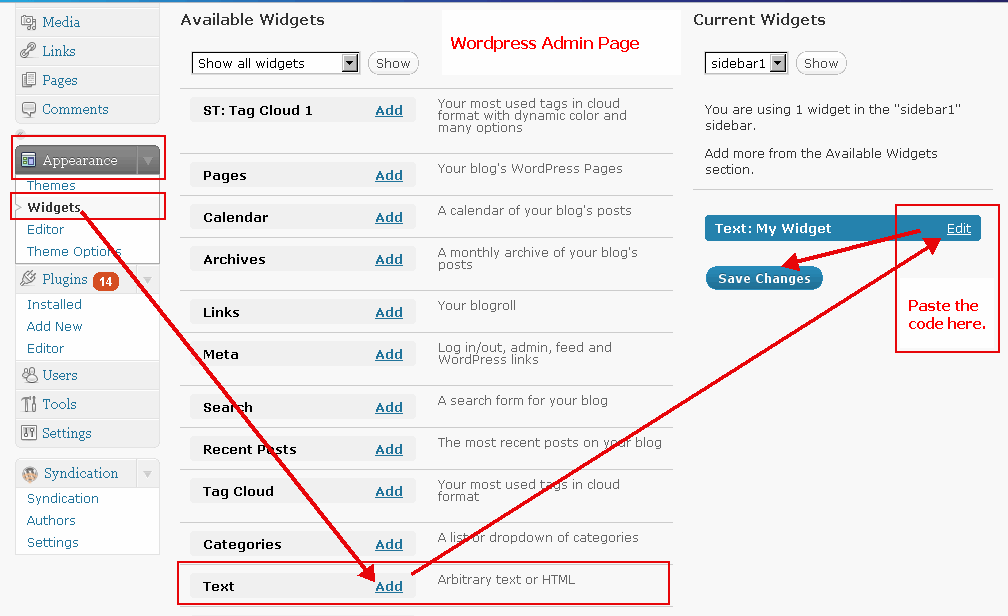
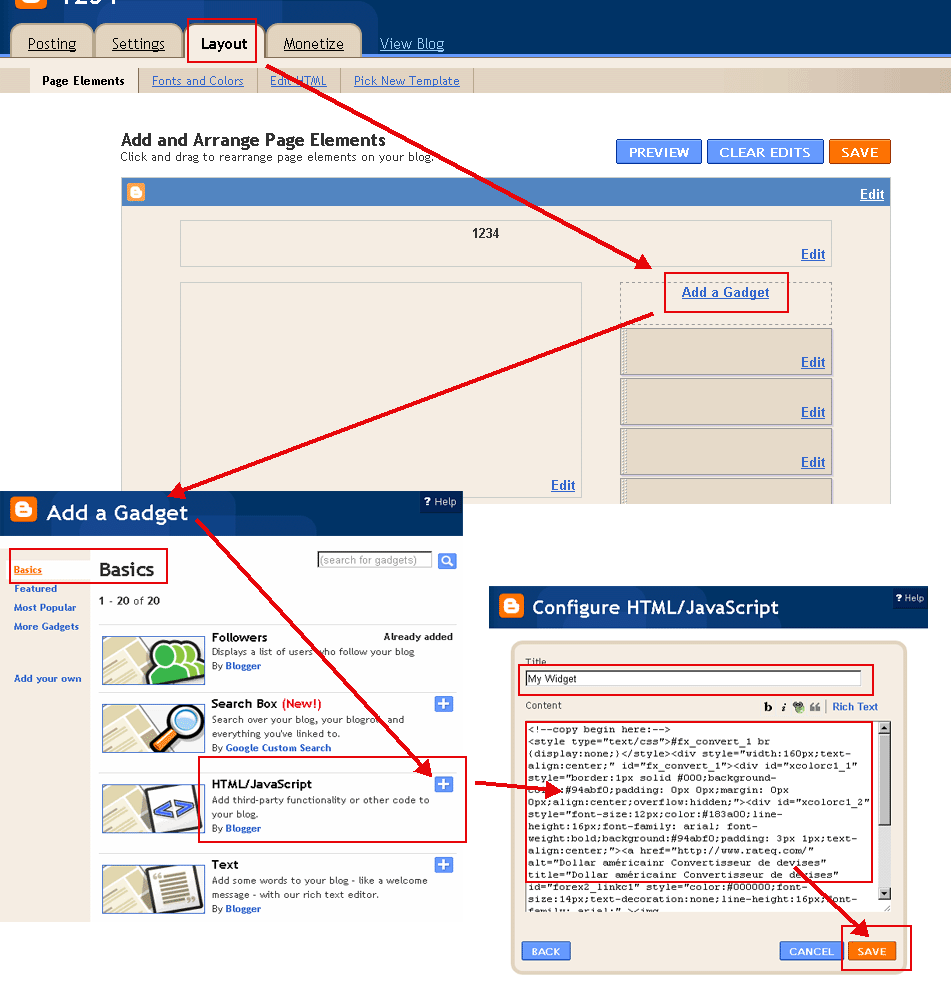
Pressione o botão copiar e colar no seu blog ou website.
(Por favor mudar para o modo HTML ao postar em seu blog. Exemplos:
Exemplo WordPress
,
Exemplo Blogger
)
Select Color(
?
):
Cor da Fonte(
?
):
formato de data:
Pod 21 2018 10:23:39 AM
21 Pod 2018 10:23:39 AM
5/21/2018 10:23:39 AM
21/5/2018 10:23:39 AM
2018/5/21 10:23:39 AM
2018-5-21 10:23:39 AM
Pod 21 2018 Segunda-feira 10:23:39 AM
21 Pod 2018 Segunda-feira 10:23:39 AM
5/21/2018 Segunda-feira 10:23:39 AM
21/5/2018 Segunda-feira 10:23:39 AM
2018/5/21 Segunda-feira 10:23:39 AM
2018-5-21 Segunda-feira 10:23:39 AM
2018 5 21 Segunda-feira 10:23:39 AM
Segunda-feira, Pod 21 2018 10:23:39 AM
Segunda-feira, 21 Pod 2018 10:23:39 AM
Segunda-feira Pod 21 2018 10:23:39 AM
Segunda-feira 21 Pod 2018 10:23:39 AM
Harare Tempo
Copiar para área de transferência
<!--copy begin here:--> <style type="text/css">#fx_convert_1 br {display:none;}</style><div style="width:210px;text-align:center;" id="fx_time_1"><div id="xcolorc1_1" style="border:1px solid #000;background-color:#94abf0;padding: 0px 0px;margin: 0px 0px;align:center;overflow:hidden;"><div id="xcolorc1_2" style="font-size:12px;color:#183a00;line-height:16px;font-family: arial; font-weight:bold;background:#94abf0;padding: 3px 1px;text-align:center;"><a href="http://pt.timeq.org/Harare" alt="Harare - Harare Tempo" title="Harare - Harare Tempo" id="xtime_link1" style="color:#111111;font-size:14px;text-decoration:none;line-height:16px;font-family: arial;" >Harare Tempo</a></div><div id="clockptHarare1" style="color:#111111;font-size: 1em;font-family: arial; font-weight:bold"></div><script src="http://pt.timeq.org/z.php?z=Etc/GMT+2&id=clockptHarare1&t=1"></script></div></div> <!--copy end here:-->
Select Color(
?
):
Calendário
<<
>>
Do
Se
Te
Qu
Qu
Se
Sá
Calendário | Horário
Copiar para área de transferência
<!--copy begin here:--> <style type="text/css">#mort_cal_1 br {display:none;} #calendar123 td.onToday{color:#ff0000;}</style><div style="width: 160px;text-align:center;"><div style="border:1px solid #000;background-color:#fefefe;color:#333333;padding: 0px 0px;margin: 0px 0px;align:center;text-align:center;overflow:hidden;"><div id="xcolorcs1_1" style="font-size:12px;color:#173a00;line-height:16px;font-family: arial; font-weight:bold;background:#94abf0;padding: 3px 1px;text-align:center;"><a href="http://pt.timeq.org/" alt="Calendário | Horário" title="Calendário | Horário" id="gooddaycal_link" style="color:#000000;font-size:14px;text-decoration:none;line-height:16px;font-family: arial;" ><img src="http://pt.timeq.org/day.gif" border="0" style="margin:0;padding:0;border:0;" />Calendário</a> </div><DIV style="font-size:16px;"><DIV id=calendar123prev style="float:left;cursor:pointer;padding-left:5px;"><<</DIV><DIV id=calendar123next style="float:right;cursor:pointer;padding-right:5px;">>></DIV><SPAN id=calendar123year></SPAN> <SPAN id=calendar123month></SPAN> <TABLE cellSpacing=0 style="padding-left:12px;"><THEAD><TR><TD><font style='color:red;font-size:14px;'>Do</font></TD><TD style='font-color:black;font-size:14px;'>Se</TD><TD style='font-color:black;font-size:14px;'>Te</TD><TD style='font-color:black;font-size:14px;'>Qu</TD style='font-color:black;font-size:14px;'><TD>Qu</TD><TD style='font-color:black;font-size:14px;'>Se</TD><TD><font style='color:red;font-size:14px;'>Sá</font></TD></TR></THEAD><TBODY id=calendar123></TBODY></TABLE><INPUT id=calendar123prevyear type=button value='<<<'><INPUT id=calendar123today type=button value='Este'><INPUT id=calendar123nextyear type=button value='>>>'></DIV><script type="text/javascript" src="http://pt.timeq.org/z2.php"></script></div><a href="http://pt.timeq.org/" alt="Calendário | Horário" title="Calendário | Horário" id="gooddaycal_link2" style="font-size:12px;text-decoration:none;line-height:16px;font-family: arial;align:center;" >Calendário | Horário</a></div> <!--copy end here:-->
Harare - Harare Informações e Notícias:
 Calendário